The NanoKVM-Go captures video with a Lontium LT7911EXC, a chip that turns an incoming DisplayPort signal into the MIPI camera lanes a small processor can read. Sipeed doesn't name it anywhere public: not on the wiki, not in the spec table, and the NanoKVM-Go GitHub repo holds only a licence file so far.
The NanoKVM-Go is Sipeed's watch-sized USB-C KVM: about 45 × 40 × 15 mm, WiFi 6, and one USB-C cable that carries video, audio, keyboard, mouse and a virtual USB drive. Sipeed rates it at 4K @ 50 Hz or 2K @ 90 Hz, with about 60 ms of latency at 1080p60.
The capture chip decides most of that: which inputs work, the top resolution and refresh rate, and how the KVM learns what the target is sending. So it's worth knowing what's in there.
What the LT7911EXC is
Lontium describes the LT7911EXC as an I2C-controlled bridge that receives eDP 1.4 and outputs single- or dual-port MIPI. That comes from Lontium's own engineer, in the Linux kernel patch series that adds a driver for it. The series was first posted on 28 April 2026 and had reached v16 by 14 July 2026.
What the kernel binding tells us:
- Input: eDP 1.4, the embedded flavour of DisplayPort.
- Output: MIPI, single or dual port. The upstream driver uses it as a MIPI DSI bridge for display panels.
- Control: an I2C register interface, plus a reset pin.
- Power: 1.2 V for the MIPI PHY and 3.3 V for I/O.
In a KVM the chip faces the other way. It isn't driving a panel; it's receiving the target's DisplayPort signal and handing the frames to the processor over MIPI. Lontium's capture chips usually offer MIPI CSI (the camera interface) as well as DSI, but the public patch doesn't spell out CSI for this part. I haven't confirmed which mode Sipeed uses.
One more thing the chip doesn't do: USB-C. Before any video flows, the target and the KVM negotiate DisplayPort Alt Mode over USB Power Delivery. The kernel patch describes no Type-C function in the LT7911EXC, so that handshake is presumably handled elsewhere on the board.
Where it sits in the video path
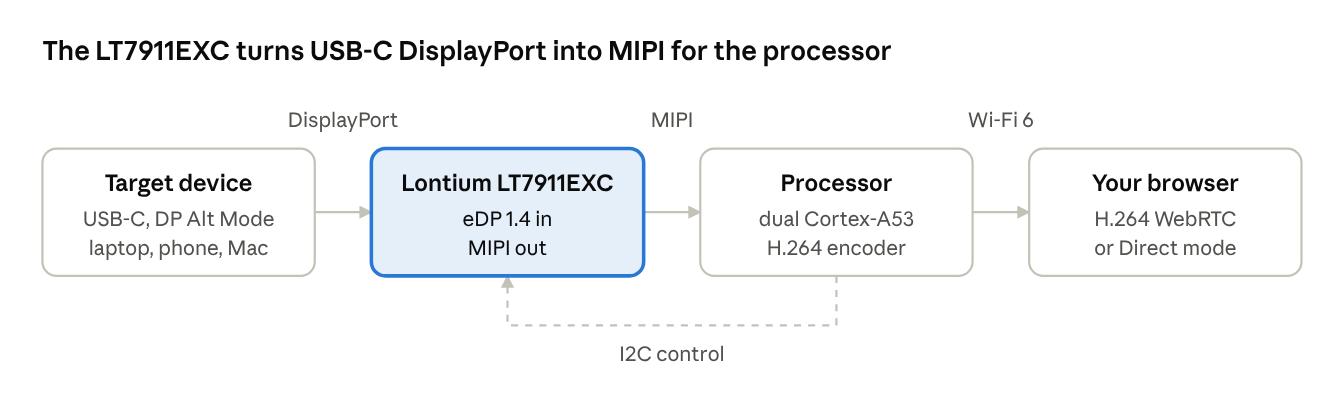
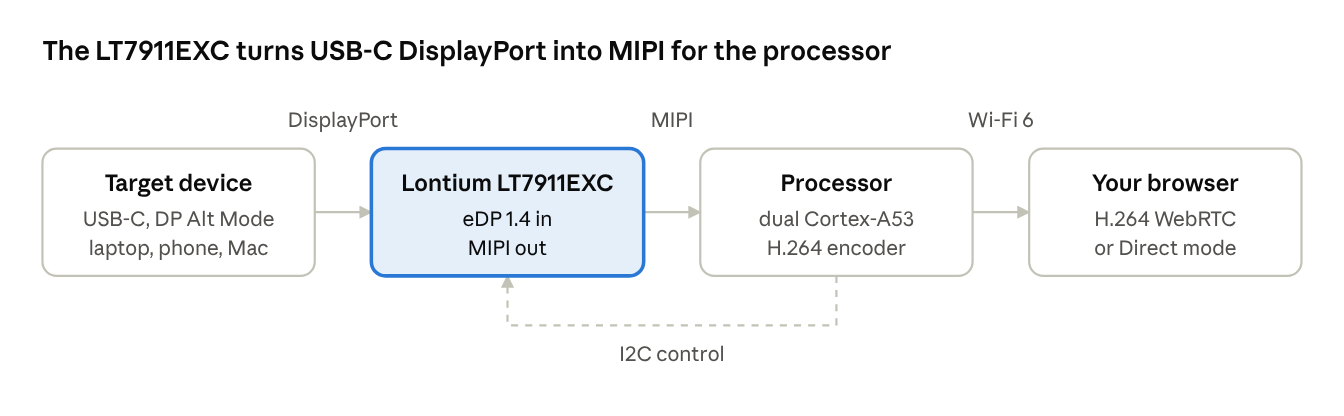
The target's USB-C port sends DisplayPort; the LT7911EXC converts it to MIPI; the processor encodes H.264 and streams it to your browser over Wi-Fi 6. The processor also configures the chip over I2C, the dashed line.
How it compares with my GL.iNet KVM
My GL.iNet Comet-series KVM also uses Lontium, but an HDMI part: the LT6911C. Its system log names it outright (lt6911c 1-002b: Resolution: 1920x1200@60 fps), so no guesswork there. The difference between the two chips is mostly the input.
| NanoKVM-Go | GL.iNet Comet-series | |
|---|---|---|
| Capture chip | Lontium LT7911EXC | Lontium LT6911C |
| Input to the chip | eDP 1.4 (from USB-C DP Alt Mode) | HDMI 1.4, up to 3.4 Gbps per channel |
| Output to the processor | MIPI, 1 or 2 ports | MIPI DSI/CSI or LVDS, 1 or 2 ports, up to 1.5 Gbps per lane |
| Top capture mode | 4K @ 50 Hz, 2K @ 90 Hz (Sipeed's spec) | 4K @ 30 Hz |
| Processor | Dual-core Cortex-A53 (Sipeed doesn't name it) | Rockchip RV1126B (per its boot log) |
| HDMI loop-out | None | Yes, via a Lontium LT86102SXE (per its log) |
The 4K @ 30 Hz ceiling on the GL.iNet matches what its log shows when a 4K signal arrives: 3840x2160@30. HDMI 1.4's 3.4 Gbps per channel is the limit. The LT7911EXC's eDP 1.4 input gives the NanoKVM-Go more headroom, which is how it reaches 4K @ 50 Hz in a much smaller box.
How to check the capture chip on your own KVM
The capture chip almost always sits on an I2C bus, and Linux usually knows its name. SSH into the KVM and run:
# names of every I2C device the kernel has bound
cat /sys/bus/i2c/devices/*/name

# boot messages from the capture driver
dmesg | grep -iE "lt[0-9]|edid|csi|mipi|resolution" | head -40

# the capture devices themselves
ls /dev/video*
On the GL.iNet, the second command gives the game away straight away: lt6911c 1-002b means an LT6911C on I2C bus 1 at address 0x2b.
If the vendor's software talks to the chip from user space instead, nothing may show up by name. Then the reliable way is the old one: open the case and read the markings on the chip next to the video input.
Wrapping up
The LT7911EXC is the reason the NanoKVM-Go can be a one-cable USB-C device. A DisplayPort receiver, rather than an HDMI one, lets it take video straight from a laptop, phone or Mac's USB-C port and still reach 4K @ 50 Hz.
If you're choosing between KVMs, the capture chip tells you more than the marketing page. Check the input it accepts and its top mode, and you know what the box can see before you buy it.

Member discussion: